推薦:asp.net初學者:petshop4.0設計說明petshop4.0設計說明
一、項目名稱及描述:(實現步驟為:4-3-6-5-2-1)
1、WEB=表示層
2、BLL=業務邏輯層
3、IDAL=數據訪問層接口定義
4、Model=業務實體
5、DALFactory=數據層
效果圖
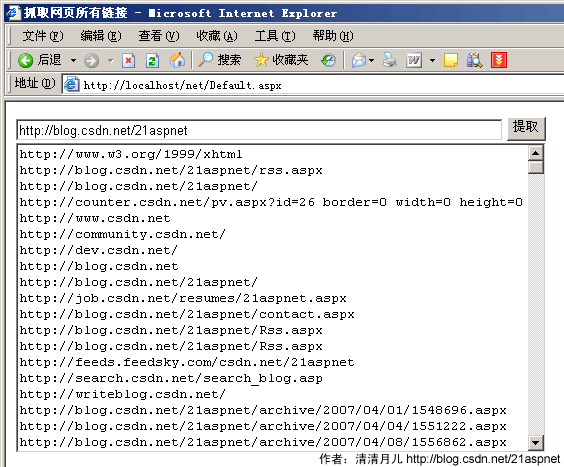
后臺代碼
|
以下為引用的內容:
using System;
using System.Data;
using System.Configuration;
using System.Web;
using System.Web.Security;
using System.Web.UI;
using System.Web.UI.WebControls;
using System.Web.UI.WebControls.WebParts;
using System.Web.UI.HtmlControls;
using System.Text.RegularExpressions;
using System.Net;
using System.IO;
using System.Collections;
public partial class _Default : System.Web.UI.Page
{
protected void Page_Load(object sender, EventArgs e)
{
if (!IsPostBack)
{
}
}
protected void Button1_Click(object sender, EventArgs e)
{
TextBox2.Text = "";
string web_url = this.TextBox1.Text;//"http://blog.csdn.net/21aspnet/"
string all_code = "";
HttpWebRequest all_codeRequest = (HttpWebRequest)WebRequest.Create(web_url);
WebResponse all_codeResponse = all_codeRequest.GetResponse();
StreamReader the_Reader = new StreamReader(all_codeResponse.GetResponseStream());
all_code = the_Reader.ReadToEnd();
the_Reader.Close();
ArrayList my_list = new ArrayList();
string p = @"http://([\w-] \.) [\w-] (/[\w- ./?%&=]*)?";
Regex re = new Regex(p, RegexOptions.IgnoreCase);
MatchCollection mc = re.Matches(all_code);
for (int i = 0; i <= mc.Count - 1; i )
{
bool _foo = false;
string name = mc[i].ToString();
foreach (string list in my_list)
{
if (name == list)
{
_foo = true;
break;
}
}//過濾
if (!_foo)
{
TextBox2.Text = name "\n";
}
}
}
}
|
前臺
以下為引用的內容:
<%@ Page Language="C#" AutoEventWireup="true" CodeFile="Default.aspx.cs" Inherits="_Default" %>
<!DOCTYPE html PUBLIC "-//W3C//DTD XHTML 1.0 Transitional//EN" "http://www.w3.org/TR/xhtml1/DTD/xhtml1-transitional.dtd">
<html xmlns="http://www.w3.org/1999/xhtml" >
<head runat="server">
<title>抓取網頁所有鏈接</title>
</head>
<body >
<form id="form1" runat="server">
<div>
<asp:TextBox ID="TextBox1" runat="server" Width="481px"></asp:TextBox>
<asp:Button ID="Button1" runat="server" OnClick="Button1_Click" Text="提取" />
<br />
<asp:TextBox ID="TextBox2" runat="server" Height="304px" TextMode="MultiLine" Width="524px"></asp:TextBox></div>
</form>
</body>
</html>
|
分享:三層架構各層間的訪問過程1、傳入值,將值進行類型轉換(為整型)。
2、創建bll層的對象,通過對象訪問bll層的方法調用bll層。
3、bll層方法中取得數據訪問層的實例,實例化idal層的接口對象,這個對象是由工廠層創建的
 。
。